

Server-side caching keeps GET requests to your Salesforce B2C Commerce REST APIs fast without hammering the application server on every call. For years, the OCAPI handled this through settings in the Business Manager, but the OCAPI was deprecated platform-wide in April 2026.
Note
Updated July 2026: This article originally covered only OCAPI cache configuration. The guidance below now starts with how caching works for Custom SCAPI endpoints; the original OCAPI walkthrough is preserved further down for the archives.
Note
Updated August 2026: This article originally claimed the standard Shopper APIs have no cache-time control at all. They do — through a
modifyGETResponsehook rather than inline in an endpoint script. See Caching Standard Shopper APIs via Hooks below.
Caching Custom SCAPI Endpoints
Custom SCAPI endpoints — the officially supported way to add your own routes to the Salesforce Commerce API — can cache their responses, but the mechanism looks nothing like the OCAPI settings further down this article. Instead of a JSON cache_time value, you call two Script API methods directly inside the endpoint’s implementation script, as described in Salesforce’s Custom API caching guide.
Page Cache still has to be enabled for the site first, exactly like it did for OCAPI. With that in place, here’s a Custom Product API endpoint that caches its response for 60 seconds:
var RESTResponseMgr = require("dw/system/RESTResponseMgr");

exports.getCustomProduct = function () {
  var customProduct = // ... some lookup of custom product data ...

  // set cache time to 60 seconds
  response.setExpires(Date.now() + 60000);

  RESTResponseMgr.createSuccess(customProduct).render();
};

exports.getCustomProduct.public = true;
response.setExpires(milliseconds) takes an absolute timestamp, not a duration — that’s why it’s Date.now() + 60000 and not just 60000. Get that backwards and the cache time ends up wildly wrong, since a bare millisecond count reads as a moment already in the past.
If a resource’s cache validity depends on something other than time — a promotion, for instance — mark it with setVaryBy() instead:
var RESTResponseMgr = require("dw/system/RESTResponseMgr");

exports.getCustomProduct = function () {
  var customProduct = // ... some lookup of custom product data ...

  // set caching based on promotion
  response.setVaryBy("price_promotion");

  RESTResponseMgr.createSuccess(customProduct).render();
};

exports.getCustomProduct.public = true;
setVaryBy() marks the response as personalised, so the cache doesn’t serve one shopper’s promotion-adjusted price to another. Use it carefully: flag a response as personalised when it isn’t, and you lose most of the cache-hit benefit you were chasing in the first place.
Calling setExpires()/setVaryBy() directly in your endpoint script like this is specific to Custom APIs — the endpoints you write yourself. The standard Shopper APIs (Products, Search, Categories, and the rest) don’t give you that same inline control, since there’s no endpoint script of your own to call it from — but they aren’t locked out of cache control entirely.
Caching Standard Shopper APIs via Hooks
The standard Shopper APIs are cached automatically by the platform’s server-side web-tier caching, with a fixed default TTL per API and expansion — 900 seconds for the prices and promotions expansions on Products, for instance. You can’t change that from a Custom API-style script, since there isn’t one here, but you can override it from inside a dw.ocapi.shop.*.modifyGETResponse hook — the same hook family covered in Using OCAPI and SCAPI Hooks in SFCC — using the identical response.setExpires() and response.setVaryBy() calls:
var Status = require("dw/system/Status");

exports.modifyGETResponse = function (scriptProduct, doc) {
  response.setExpires(Date.now() + 3600000);
  response.setVaryBy("price_promotion");
  return new Status(Status.OK);
};
(Salesforce’s own published example for this is written for the sibling category hook; the product hook takes the same two calls, since both share the same dw.system.Response API and hook family.) setVaryBy() still only accepts price_promotion here — any other value has no effect.
One catch worth knowing before you rely on this: the web-tier cache key is calculated before your hook runs, so any price book or promotion changes you make inside the hook aren’t reflected in the cache key itself. setVaryBy("price_promotion") is what tells the platform to treat the response as personalised despite that, so one shopper’s hook-computed price doesn’t get cached and handed back to the next shopper who hits the same URL. How SFCC Price Books Actually Work walks through a concrete case of this going wrong: a custom price attached in a product hook, cached against the wrong shopper because setVaryBy() was never called.
Custom Caches to the rescue (for hooks)
Custom caches let you store your own key/value data in memory. They’re most useful on SCAPI endpoints where hooks add customisation logic that would otherwise repeat expensive work on every request. A few concrete uses:
- Reducing database queries: cache the result of an expensive lookup in memory, so the next call reads from the cache instead of hitting the database again.
- Complex calculations: cache the output of a calculation or transformation once, so subsequent requests skip re-computing it.
- Third-party API responses: if your endpoint calls an external API, cache the response so a slow upstream call doesn’t slow down every request that needs the same data.
For the Archives: OCAPI Cache Configuration
What follows is the original OCAPI caching walkthrough as it ran when this article was first published in April 2023, preserved for the archives. Read it as a period piece: the "_v": "22.6" schema version in both JSON examples below was current at the time of writing (OCAPI versioning stopped at 24.5 before the platform-wide deprecation), and the configuration it describes no longer applies to new development.
What can be cached in the OCAPI
Before we start, we must understand that not all API endpoints support caching. But which ones do?
- Meta API
- Categories
- Content
- ContentSearch
- CustomObjects
- Folders
- Products
- ProductSearch
- Promotions
- SearchSuggestion
- Site
- Stores
This is quite an extensive list and contains all the objects we would expect to support caching!
Note
All twelve links above still resolve as of July 2026, now labelled “(deprecated)” in their page titles rather than removed. Salesforce hasn’t pulled the OCAPI reference docs, just relabelled them.
Note
Only GET calls can be cached.
Note
The Data API does not support caching at all.
Page Cache
An important thing to remember before starting to tinker with the Shop API (part of the OCAPI) caching is to enable the “Page Cache” for the site you will be working with. If the Page Cache is disabled, you will see this header value on every response:
cache-control: no-cache, no-store, must-revalidate
This is easy to fix. But without enabling it, you cannot test your settings on a sandbox where this is usually disabled.
Warning
It is not possible to clear the Page Cache for the OCAPI only, it will take your storefront (SiteGenesis/SFRA) with it. Clearing the page cache can create a heavy load on the application servers. Only clear the page cache manually when necessary, and avoid clearing it during times of high traffic.
Overriding the OCAPI Cache Time
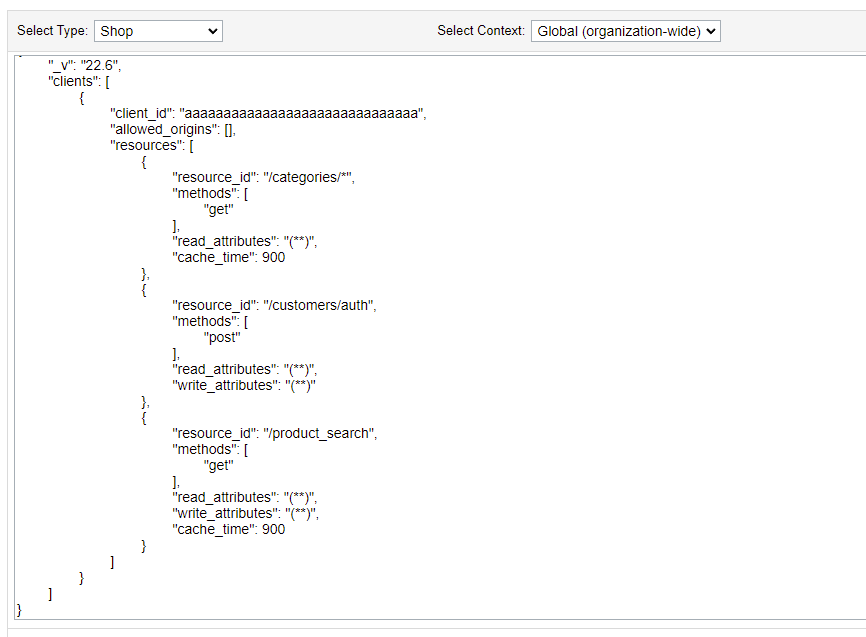
It is possible to override the default 60 seconds of caching of a resource by adding it to the OCAPI Settings in the Business Manager. “Administration” > “Site Development” > “Open Commerce API Settings”
{
    "_v": "22.6",
    "clients": [
        {
            "client_id": "aaaaaaaaaaaaaaaaaaaaaaaaaaaaaa",
            "allowed_origins": [],
            "resources": [
                {
                    "resource_id": "/categories/*",
                    "methods": [
                        "get"
                    ],
                    "read_attributes": "(**)",
                    "cache_time": 900
                },
                {
                    "resource_id": "/customers/auth",
                    "methods": [
                        "post"
                    ],
                    "read_attributes": "(**)",
                    "write_attributes": "(**)"
                },
                {
                    "resource_id": "/product_search",
                    "methods": [
                        "get"
                    ],
                    "read_attributes": "(**)",
                    "write_attributes": "(**)",
                    "cache_time": 86400
                }
            ]
        }
    ]
}
Adding “cache_time” to the resource configuration lets you easily control the time responses are cached. You can set a maximum value of 86,400 seconds (1 day).
“Expand” parameter
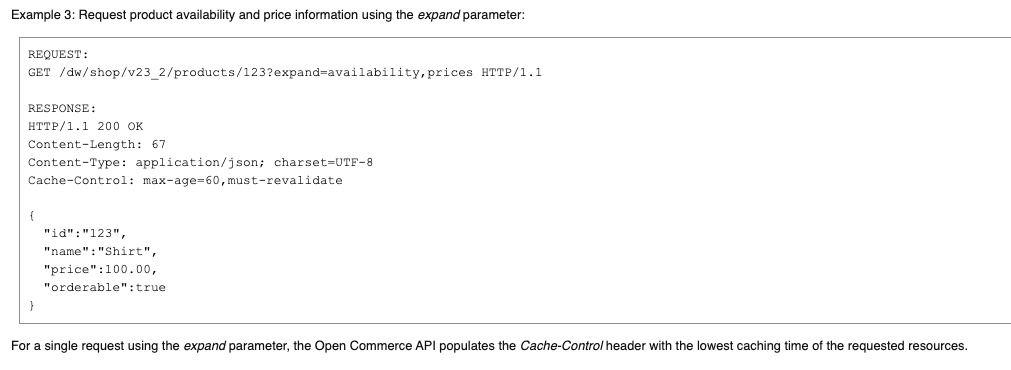
Lowest cache time wins. When you use the expand parameter to make a single request with the Open Commerce API, the Cache-Control header is automatically populated with the lowest caching time of the requested resources.
Personalised Caching
Personalised caching is enabled by default based on the customer context (JWT). It is possible to disable this for a resource to improve performance.
{
    "_v": "22.6",
    "clients": [
        {
            "client_id": "aaaaaaaaaaaaaaaaaaaaaaaaaaaaaa",
            "allowed_origins": [],
            "resources": [
                {
                    "resource_id": "/product_search",
                    "methods": [
                        "get"
                    ],
                    "read_attributes": "(**)",
                    "write_attributes": "(**)",
                    "cache_time": 86400,
                    "personalized_caching_enabled": false
                }
            ]
        }
    ]
}
By setting the personalized_caching_enabled option to false, personalisation will be disabled for that resource.
Note
You can find information about other options (not related to caching) for resources on Salesforce Developers.
OCAPI Caching Best Practices
There is a lot of information and best practices available on Salesforce Developers, including a dedicated OCAPI Cache Management section covering cache_time and personalized_caching_enabled in more depth.