

Salesforce B2C Commerce Cloud (SFCC) provides many security features out of the box. And because it’s a SaaS platform, Salesforce’s own technical teams handle the security of the servers.
That doesn’t mean you can just lay back and stop worrying about security. Here’s what still falls on you when you develop for B2C Commerce Cloud.
Account Manager Security
Salesforce removed “local users” — separate login credentials scoped to a single sandbox — from B2C Commerce environments. Access to sandboxes and PIG (Primary Instance Group) instances now goes exclusively through Account Manager and its security features.
This has brought up many discussions about sharing accounts over the past year (more on the core platform than on SFCC).
You might think it strange that the first topic is securing your account. But if someone has access, they can upload malicious code or download sensitive data with little effort.
Single account to rule them all
The main advantage (from my perspective) is that you now have one account to log in to many different environments (and across realms).
But this comes at a price.
If an account becomes compromised — especially one with Account Manager admin privileges, not just SFCC access — someone can reach every environment tied to it in one swing.
Salesforce made MFA mandatory for interactive B2C Commerce logins in May 2022 to mitigate this threat, after recommending it for about a year beforehand.
MFA (Multi-Factor Authentication)

Account Manager lets you add MFA to your account. Even if someone figures out your password, they still need the secondary authentication method to get in.
For many people, adding Salesforce Authenticator to the log-in procedure was clunky at first — extra taps, a separate app to juggle — though it’s improved since.
Account Manager supports several MFA options:
- Salesforce Authenticator (Application)
- Security Key (Physical Device)
- TOTP (Time-based one-time password) application
- Salesforce Identity (Documentation)
I decided to make logging in a bit more manageable by building “Automaton,” a browser (Chromium) extension that acts as a TOTP generator for Account Manager. It’s still maintained — the last update shipped in July 2024 — and automatically fills in your username, password, and one-time code once you’ve unlocked it with a “Vault Password,” so having access to your laptop alone isn’t enough to log in. Run into a problem? The support repo is the place to report it.
The extra step costs you a few seconds at every login. Weigh that against the alternative: one stolen password away from every environment tied to your account being open to whoever has it.
Shared Accounts
Sharing accounts is something Salesforce advises against, for good reason — but it still happens.
Where does this actually come up in SFCC?
- An integration user
- … no, that’s about it
You rarely need to log into Business Manager (SFCC’s admin console) as an integration user. When you do, more than one person usually needs the credentials — for coverage during leave or sick days.
So think of secure ways to share your MFA (usually TOTP for shared accounts). A good solution I found so far is 1password which supports TOTP.
Cloudflare
Salesforce’s built-in services block a lot of malicious traffic, but they can’t stop everything that means to do harm.
The eCDN (Salesforce’s embedded content delivery network) in front of your storefront is Cloudflare: Salesforce controls most of the configuration, but leaves a handful of switches for you to flip in Business Manager, covering things like the WAF (web application firewall), TLS, and compression settings. I go into that setup in detail in Let’s Go Live: Setting Up the eCDN; Salesforce Help has the official overview.
Security Best Practices
Salesforce has already documented security best practices for developers, which spares me — and you — from working them out from scratch.
On Salesforce Help, there is a lot of information already documented about different types of attacks and how to mitigate them:
- Encryption and Cryptography
- Cross-Site Scripting
- Declarative Security via HTTP Headers
- Commerce Script Injection
- Cross-Site Request Forgery
- Secret Storage
- Using Hooks Securely
- Data Validation
- Open Redirect Attacks
- Authentication and Authorisation
- Supply Chain Security
- Secure Logging
- General Secure Coding Practices
- AgentExchange Security Reviews (this guide covered AppExchange until Salesforce folded it into AgentExchange)
Quite the list, isn’t it! Salesforce handles the infrastructure layer, but skip these guidelines and the next incident review will ask why the documented pattern wasn’t followed.
Security Headers in SFRA
Salesforce’s Storefront Reference Architecture (SFRA) lets developers set specific response headers to tell browsers and applications what’s permitted on the storefront.
SFRA ships a config file that sets headers for every response at once, instead of repeating the same logic in each controller. Salesforce’s own support article on adding custom headers in SFRA still points at that same path.
[
    {
        "id": "Content-Security-Policy",
        "value": "frame-ancestors 'self'"
    },
    {
        "id": "X-Content-Type-Options",
        "value": "nosniff"
    }
]
The standard file only sets two security headers, but you can add more.
Salesforce limits the headers you can set to a list of constants in the Response class.
Here’s the full list, with what each one actually does:
Access-Control-Allow-Credentials
Set Access-Control-Allow-Credentials to true when a cross-origin request carries credentials (Request.credentials: "include") and you want the browser to expose that response to the requesting page’s JavaScript. Leave it unset and the browser hides the response even if the request itself succeeded.
Access-Control-Allow-Headers
Before certain cross-origin requests, the browser first sends a preflight OPTIONS call asking what’s allowed. Access-Control-Allow-Headers answers that question for custom request headers: list the ones your endpoint accepts, and the browser lets the real request through.
Access-Control-Allow-Methods
Access-Control-Allow-Methods answers that same preflight check for HTTP methods: list PUT, DELETE, or whichever verbs your endpoint supports, or the browser blocks the follow-up request before it reaches your controller.
Access-Control-Allow-Origin
Access-Control-Allow-Origin decides which origins may read the response at all. Setting it to * is the easiest option, but it means any site can read that response — scope it to the specific origins you trust instead.
Access-Control-Expose-Headers
Access-Control-Expose-Headers is the reverse of Allow-Headers: it lists which of your response headers a cross-origin script may read, beyond the handful browsers expose by default — a custom pagination or rate-limit header your storefront JavaScript needs to see, for example.
Content-Security-Policy
Content-Security-Policy controls which origins a page may load scripts, styles, and other resources from — the actual defence against cross-site scripting attacks, since an injected script tag can’t run if its origin isn’t allow-listed. With a few exceptions, policies mostly involve specifying server origins and script endpoints.
Note: The Commerce Cloud platform can override this header for tools like the Storefront Toolkit.
Content-Security-Policy-Report-Only
Content-Security-Policy-Report-Only runs the same policy in observe-only mode: violations get logged as JSON, POSTed to a reporting URI, but nothing is actually blocked — useful for testing a tighter CSP before you commit to enforcing it.
Note: You can set this response header only for storefront requests. Report recipient can’t be a B2C Commerce system.
Cross-Origin-Embedder-Policy
Cross-Origin-Embedder-Policy (COEP) blocks a document from loading cross-origin resources unless those resources explicitly opt in, via the Cross-Origin-Resource-Policy header (CORP) or CORS. It’s what lets a page use powerful browser APIs, such as SharedArrayBuffer, that would otherwise leak data across origins.
Cross-Origin-Embedder-Policy-Report-Only
The report-only counterpart to Cross-Origin-Embedder-Policy: it monitors and reports COEP violations without actually blocking the resources involved, which is useful for testing a policy before you enforce it. It’s one of the constants Salesforce added to the Response class since this article’s original list was written.
Cross-Origin-Opener-Policy
Cross-Origin-Opener-Policy (COOP) keeps a top-level document out of the same browsing context group — the internal grouping that lets window.opener and similar APIs reach across tabs — as any cross-origin document it opens or is opened by. Salesforce’s Response class also exposes a Cross-Origin-Opener-Policy-Report-Only constant for testing a COOP policy before enforcing it, though MDN doesn’t have a dedicated reference page for it yet.
Cross-Origin-Resource-Policy
Cross-Origin-Resource-Policy (CORP) tells the browser to block cross-origin, no-cors requests — the fetch mode that skips CORS checks — from reading this resource at all, closing a gap CORS alone doesn’t cover for things like images and scripts loaded without credentials.
Permissions-Policy
The Permissions-Policy header restricts which browser features (camera, geolocation, autoplay, and dozens more) a page and its embedded frames are allowed to use. Setting it to a narrow allowlist limits what a compromised or malicious script embedded on your page could actually do with the browser’s capabilities.
Referrer-Policy
Referrer-Policy controls how much of your page’s URL leaks into the Referer header of outgoing requests. Set it to strict-origin-when-cross-origin or tighter if your URLs ever carry order IDs, session tokens, or other data you don’t want showing up in a third party’s server logs. You can also set this policy in HTML, alongside the header.
X-Content-Type-Options
X-Content-Type-Options set to nosniff stops the browser from guessing a file’s type from its content instead of trusting the declared Content-Type. Without it, a browser that reads an uploaded text file as HTML or JavaScript can end up executing content it should have just displayed.
X-FRAME-OPTIONS
X-Frame-Options tells the browser whether it may render this page inside a <frame>, <iframe>, <embed />, or <object>. Set it to block embedding and you close off click-jacking attacks that trick users into clicking a disguised, invisibly-framed version of your page.
Note: The Commerce Cloud platform can override this header for tools like the Storefront Toolkit.
Note: The values of this header are restricted to: “ALLOW-FROM”, “DENY”, “SAMEORIGIN”. Salesforce’s Response class still documents ALLOW-FROM, but it’s an obsolete directive that modern browsers ignore entirely — use the Content-Security-Policy frame-ancestors directive instead if you need per-origin control.
X-XSS-Protection
A legacy header that told older browsers to stop rendering a page when they detected a reflected XSS attack. It’s deprecated and modern browsers have removed their XSS filters, so a solid Content-Security-Policy is what actually protects you today — this one’s here for completeness since Salesforce still exposes the constant.
PWA Kit
PWA Kit, Salesforce’s React-based framework for composable storefronts, shipped back in 2021, and security guidance for it has caught up since. Managed Runtime — the hosting layer that runs PWA Kit apps — now has its own best practices guide linking out to the B2C Commerce security guide, bot management, and bot mitigation, while the Managed Runtime overview documents the WAF, proxy, and CDN layer that sits in front of your storefront by default. I’ve also covered storefront-level protection — gating an unfinished or staging site behind Basic Auth — separately in Storefront Protection For Your Composable Storefront (worth a refresh of its own, but the approach it describes still holds).
Malicious Modules
SFCC’s server-side scripting runs on the Rhino engine, a JavaScript runtime older than Node.js that doesn’t provide Node’s built-in modules (fs, http, native addons). Most npm packages assume those modules exist, so finding one that works unmodified is rare — in many cases, they need to be converted first.
PWA Kit changes that: it runs on Node.js, so you get far more freedom with third-party packages, and with that freedom comes more responsibility. The same risk already applies to storefront JavaScript in SiteGenesis and SFRA (SFCC’s legacy and current reference storefronts) — that code runs in the shopper’s browser, not on Rhino, so it was never subject to those limitations, and you’ve likely already installed packages there to extend the storefront.
npm is an open ecosystem: anyone can publish a module, and anyone can pull that code into their project with one npm install.
But what if that maintainer is malicious? They could slip harmful code into the package directly — or the package itself could be clean while a dependency it pulls in isn’t.
For a deeper walkthrough of this attack pattern, see Liran Tal’s post:
npm-audit
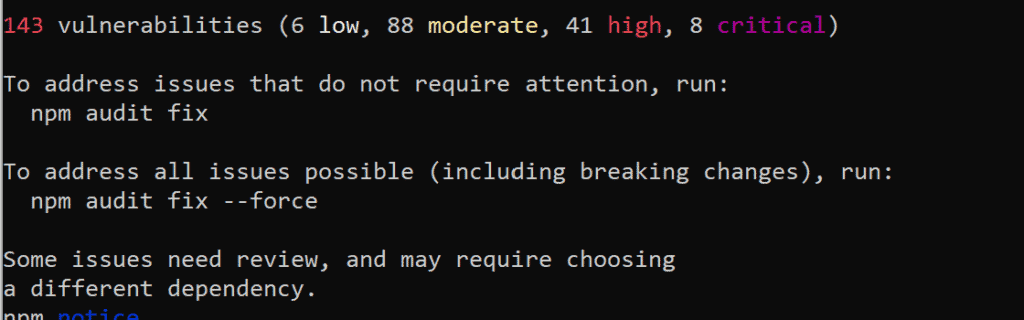
Since SFRA and PWA Kit both pull third-party libraries through npm, run npm audit against your dependencies before you ship — no extra tooling required.
The audit command submits a description of the dependencies configured in your project to your default registry and asks for a report of known vulnerabilities.
Note: A patched dependency that breaks checkout, cart, or search is its own incident — run your test suite after every update, not just npm audit.